


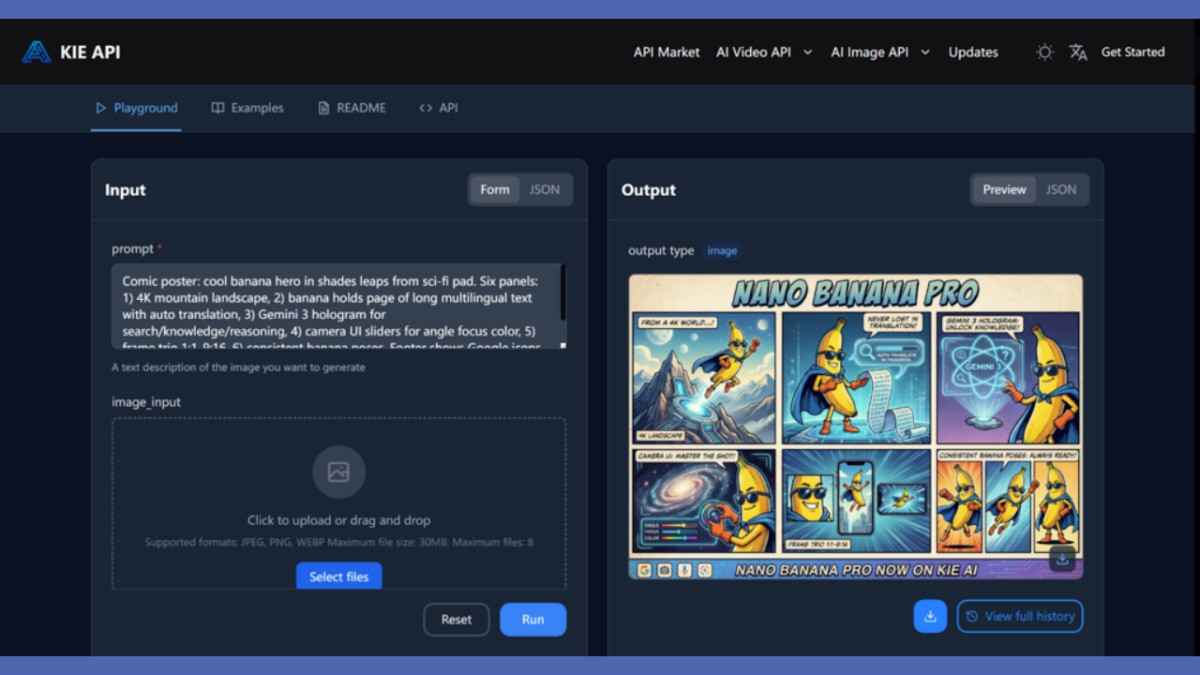
For developers looking to create high-quality visuals without breaking the bank. The cost of traditional design tools can be a significant barrier. Whether you’re an independent developer, a small business, or part of a growing studio. Maintaining a steady flow of professional-grade images for your projects often means significant investments in expensive software or design services. Nano Banana Pro API on Kie.ai offers a solution. Allowing developers to generate high-quality images at a fraction of the cost compared to other platforms.
Whether you’re working on a video game, marketing materials, or social media content. This API ensures that you can create stunning visuals quickly and efficiently without the high upfront costs. In this article, we’ll dive into how Kie.ai’s Nano Banana Pro API pricing makes it the ideal choice for developers on a budget.
Key Features of Nano Banana Pro API
High-Resolution Image Generation: 1K, 2K, and 4K Options
The Nano Banana Pro API offers support for generating images in multiple resolutions, including 1K, 2K, and 4K. This flexibility allows developers to create high-quality images suitable for various platforms. Whether it’s for social media, websites, or print materials. With the ability to choose the appropriate resolution for your needs, the API ensures that visuals always look sharp and professiona. Meeting the requirements of any project, big or small.
Enhanced World Knowledge and Prompt Understanding
One of the standout features of the Nano Banana Pro API is its ability to generate contextually rich and highly accurate images based on prompts. Thanks to enhanced reasoning capabilities and real-time information. The API interprets your input with a high degree of precision. Ensuring that the generated visuals align with your specified context. This feature is especially beneficial for developers working on projects that require nuanced, context-sensitive visuals. Like video game assets or marketing materials.
Advanced Text Rendering for Multilingual Localization
The Nano Banana Pro API enables seamless text rendering directly within images. This feature is highly valuable for developers who need to create localized visuals for a global audience. With the ability to generate multilingual text with high clarity, game developers can easily adapt their visuals for different regions. Ensuring their content is accessible and professionally presented without needing to rely on additional translation or localization tools.
Multi-Image Fusion and Consistency Across Visuals
With the Nano Banana Pro API, developers can input up to 14 images and ensure that consistency is maintained across them. This is particularly useful for projects that require visual coherence, such as game storyboards or promotional assets. The API ensures that up to 5 characters or visual elements remain consistent across all generated images. Making it easier to create a unified visual identity throughout the project, whether for branding or game development.
Nano Banana Pro API Pricing Comparison: Kie.ai vs. Others
When it comes to selecting an image generation service, pricing plays a crucial role. Especially for businesses and developers aiming for high-quality visuals without exceeding their budgets. Let’s take a closer look at how the Nano Banana Pro API pricing on Kie.ai compares to other leading competitors in the market.
Kie.ai : Unbeatable Nano Banana Pro API Pricing for 1K, 2K, and 4K Images
Kie.ai offers one of the most competitive pricing models for its Nano Banana Pro API. The cost for generating 1K and 2K resolution images is an incredibly affordable $0.09 per image. While 4K resolution images are priced at just $0.12 per image. This Nano Banana Pro API pricing structure makes it an excellent choice for developers and businesses looking to produce high-quality visuals at a fraction of the cost of other platforms.
Google’s Image Generation Pricing: A More Expensive Option for High-Resolution Outputs
In comparison, Google’s image generation pricing is higher, with 1K and 2K resolution images priced at $0.134 per image. For 4K images, Google’s pricing jumps to $0.24 per image, which makes Kie.ai’s Nano Banana Pro API a much more affordable choice. Especially for businesses that require a large volume of high-resolution images.
Fal.ai Pricing: Higher Costs for Standard and High-Resolution Images
Fal.ai charges $0.15 per image for both 1K and 2K resolution images. Additionally, for 4K image generation, the price increases significantly to $0.30 per image. Moreover, Fal.ai imposes an extra fee of $0.015 per image if users opt to use the web search functionality. Making it a costlier option when factoring in additional services.
Replicate.com Pricing: Similar to Fal.ai, But With High Costs for 4K Images
Similarly, Replicate.com also charges $0.15 per image for 1K and 2K resolution images. Their 4K images are priced at $0.30 per image, which is almost three times more expensive than Kie.ai’s 4K pricing.
Additional Features of Kie.ai Beyond Competitive Pricing
Free Trial for New Users: Get Started Without Commitment
Kie.ai offers a free trial for new users, providing a risk-free opportunity to test the capabilities of the Nano Banana Pro API and other services. This free trial allows businesses and developers to explore features like AI image generation, advanced editing, and multilingual text rendering without any upfront investment. The trial period provides valuable insights into the platform’s potential, ensuring that users can evaluate its fit for their creative workflows before committing to a paid plan.
Comprehensive Nano Banana Pro API Documentation: Simplifying Integration
Kie.ai provides detailed and user-friendly documentation for the Nano Banana Pro API, making integration into your project seamless. The documentation covers all aspects of the API, from basic setup and authentication to more advanced features like image resolution control, aspect ratio adjustments, and callback setup. With clear instructions and thorough explanations, the documentation ensures that developers, regardless of their experience, can easily get started with integrating the API into their workflows.
Access to Multiple APIs for Diverse Needs
Kie.ai offers access to a wide range of APIs, allowing developers to explore various solutions for their projects. In addition to the Nano Banana Pro API, users can test and integrate other powerful APIs, providing them with a one-stop platform for their image generation and editing needs. This diverse API offering enables developers to choose the most suitable tool for their requirements, whether for AI image editing, multi-image fusion, or other visual generation tasks.
API Usage Logs: Stay Informed and Track Performance
Kie.ai provides API usage logs, allowing users to monitor their Nano Banana Pro API requests and performance over time. These logs provide detailed insights into the number of API calls made, the status of each request, and any issues that may arise. This level of transparency helps developers track their usage, manage API consumption effectively, and stay within their budget. The logs also provide an added layer of support in troubleshooting and optimizing API calls, ensuring smooth and efficient integration into any project.
How to Integrate Nano Banana Pro API into Your Workflow
Step 1: Register and Obtain Your Nano Banana Pro API Key
To get started with the Nano Banana Pro API, the first step is to create an account on Kie.ai. Once registered, you will be provided with a unique Nano Banana Pro API key. This key is essential for authenticating all your requests to the API. Keep it secure and store it safely, as it will be used to access the service for generating and editing images.
Step 2: Configure Your API Request Parameters
After obtaining your API key, the next step is to configure the parameters for your image generation requests. Specify details like the image resolution (1K, 2K, or 4K), the aspect ratio (such as 16:9 or 1:1), and the prompt (a description of the image you want to generate). You can also set an optional callback URL to receive notifications when the image generation task is completed. These configurations ensure that the Nano Banana Pro API generates images according to your specific needs.
Step 3: Submit Your Image Generation Task
Once you’ve configured the request, submit it to the Nano Banana Pro API for processing. The task will be handled asynchronously, allowing you to continue working on other tasks while the image is being generated in the background. You will receive a task ID after submitting the request, which can be used to track the status of the image generation process.
Step 4: Retrieve and Use the Generated Image
Once the image has been successfully generated, you can retrieve it by using the task ID. If you’ve set up a callback URL, the system will notify you with a download link when the image is ready. Alternatively, you can check the task status manually. Once the image is available, you can seamlessly integrate it into your project, whether for marketing, game development, or other creative uses.
Why Kie.ai’s Nano Banana Pro API Pricing Makes It the Ideal Choice for Budget-Conscious Developers
The Nano Banana Pro API offered by Kie.ai provides a cost-effective solution for developers, especially those on a budget. Its Nano Banana Pro API pricing structure makes it one of the most affordable options in the market, offering high-resolution image generation for 1K, 2K, and 4K images at a fraction of the cost of traditional design tools. This affordability, coupled with the API’s powerful features, ensures that even small businesses or indie developers can access professional-grade visuals without breaking the bank.
